


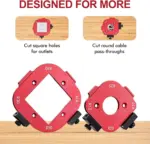

2 Pack Router Corner Radius Jig Template
Original price was: $ 120,98.$ 85,81Current price is: $ 85,81.
Many Makers Using Our Bivarlo Tools
-
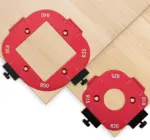
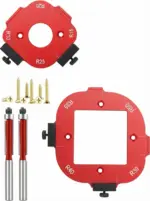
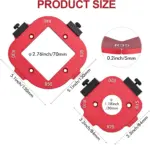
8 radius sizes in one router corner radius jig set Covers R10, R15, R20, R25, R30, R35, R40 and R50 — the full range needed for cabinet corners, tabletops, drawer fronts, and furniture edges.
-
CNC-machined aluminum alloy body Precision-milled to ±0.3mm tolerance. The template edge is the guide — no measuring, no marking, no freehand drift.
-
Works with any corner router bit Compatible with standard flush-trim and pattern router bits. Just set the corner jig router template on your workpiece and follow the edge with your router.
-
Laser-engraved radius markings Every size is permanently marked on the template — no guessing which jig is which, even after years of workshop use.
-
Use as a marking template or router guide Works as a corner radius jig for routing with a flush-trim bit, and as a marking template for band saws, jigsaws, sanders, and belt sanders.
Router Corner Radius Jig — Precision Round Corner Template Set for Woodworking
Stop free-handing rounded corners. The Bivarlo Router Corner Radius Jig gives you eight perfectly machined corner templates — from a tight R10 to a sweeping R50 — so every corner on every project is identical, repeatable, and clean. Whether you’re a professional cabinetmaker producing dozens of doors or a DIY builder making a single tabletop, this corner radius jig eliminates guesswork and delivers consistent results every time.

What Is a Router Corner Radius Jig?
A router corner radius jig is a template you place on the corner of your workpiece. You then run a corner router bit — typically a flush-trim bit with a top-mounted bearing — along the curved edge of the template. The bearing follows the jig while the bit cuts the wood to match, producing a perfect rounded corner at the exact radius you selected.
Without a corner jig router template, achieving consistent rounded corners requires a compass, careful marking, and steady freehand routing — a process that’s slow, imprecise, and produces varying results across multiple pieces. With a router corner radius jig, the entire process takes under 30 seconds per corner.

CNC-Machined Aluminum — Not Plastic
The Bivarlo router corner radius jig is milled from solid aluminum alloy on a CNC machine. This matters for two reasons. First, the template edge is the guide for your corner router bit bearing — any flex or imprecision in the template translates directly to an imprecise cut. Aluminum alloy doesn’t flex. Second, the template survives repeated clamping, impact, and workshop use without cracking, chipping, or losing its shape. Plastic corner radius jigs work initially but degrade quickly under the friction of the router bit bearing.

8 Sizes — From Subtle to Dramatic
Different projects demand different corner radii. A kitchen cabinet door typically uses R10 to R15 for a subtle softening of the corner. A children’s toy or piece of garden furniture might use R30 to R50 for a larger, safer curve. A tabletop or desk edge often lands at R20 to R25. The Bivarlo radius jig router set covers all eight sizes most commonly needed in residential cabinetry, furniture making, and general woodworking — so you’re never reaching for a jig you don’t have.
Compare this to the Woodpeckers corner radius quick jig, which offers a similar range but at a significantly higher price point and in fewer sizes per set. The Bivarlo router corner radius jig delivers the full R10–R50 range at workshop-ready aluminum quality for a fraction of the cost.

Why Choose the Bivarlo Router Corner Radius Jig?
Works as a Marking Template Too
You don’t always need a router. The corner radius jig works equally well as a marking template — hold it in place and trace the arc with a pencil, then cut with a jigsaw, band saw, or belt sander. This makes the set useful even when you’re working with thin materials too delicate for routing, or when you need to mark dozens of pieces for batch cutting before routing.
Compatible with All Major Router Brands
The Bivarlo corner jig router template works with any handheld router or router table setup from DeWalt, Bosch, Makita, Festool, Milwaukee, Ryobi, and all other standard brands. All you need is a flush-trim corner router bit with a top or bottom bearing — the most common and inexpensive pattern bit available.

Repeatable Results Across the Whole Project
The biggest problem with freehand corner routing is inconsistency. Corner one and corner twenty look different. With the Bivarlo router corner radius jig, every corner is guided by the same machined aluminum template — corner one and corner one hundred are identical. This consistency is what separates professional-looking work from amateur work, and it’s built into every pass with this jig.
Why Bivarlo Router Corner Radius Jig?
±0.3mm Tolerance
CNC-machined aluminum template holds ±0.3mm accuracy. The corner router bit bearing follows the template exactly — consistent results on every pass.
8 Sizes: R10–R50
From the tightest cabinet corner at R10 to a sweeping R50 arc for tabletops and furniture. Every size covered in one corner radius jig set.
Aluminum — Not Plastic
Solid aluminum alloy won’t flex under router bit bearing pressure or crack with repeated workshop use. Outlasts plastic corner radius jigs many times over.
Dual-Use Template
Works as a corner jig router guide and as a marking template for jigsaws, band saws, and sanders. One tool, two workflows.
Laser-Engraved Sizes
Every radius is permanently marked on the jig. No guessing which size is which — grab the right radius jig router template in seconds.
Universal Router Fit
Works with any handheld router or router table and any standard flush-trim corner router bit from DeWalt, Bosch, Makita, and all major brands.
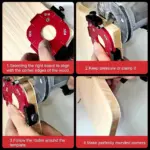
Using the Router Corner Radius Jig — Step by Step
-
1Select your radiusChoose the corner radius jig size that matches your project requirement — R10 for subtle cabinet corners, R30–R50 for dramatic furniture curves.
-
2Position the jig on the cornerAlign the two straight edges of the radius jig router template flush with the two faces of your workpiece corner. The curved edge faces out.
-
3Clamp or hold in placeHold the corner jig router template firmly against the workpiece, or clamp it lightly. The template must not move during routing.
-
4Route with a flush-trim corner router bitSet your router depth so the bearing rides the template edge. Make a smooth pass along the curved template — the corner router bit follows the jig exactly.
-
5Repeat on every cornerEvery corner routed with the same radius jig router template produces the identical arc — consistent results across the entire project batch.
What Can You Make With It?
Cabinet Doors
R10–R15 corners on shaker-style and raised-panel doors for a refined, professional edge.
Tabletops & Desks
R20–R30 sweeping corners on dining tables, desks, and workbenches for safety and style.
Drawer Fronts
Matching corner radii across all drawer fronts for a cohesive, consistent cabinet installation.
Signs & Panels
R25–R50 arcs on plywood signs, wall panels, and decorative boards for a polished finish.
Bivarlo vs Woodpeckers Corner Radius Quick Jig
| Feature | Bivarlo Router Corner Radius Jig | Woodpeckers Corner Radius Quick Jig |
|---|---|---|
| Material | ✓ CNC aluminum alloy | Aluminum / phenolic |
| Radius sizes included | ✓ 8 sizes: R10–R50 | Fewer sizes per set |
| Tolerance | ✓ ±0.3mm | ±0.5mm typical |
| Laser-engraved markings | ✓ Yes — permanent | Printed / etched |
| Works as marking template | ✓ Yes | Limited |
| Universal router compatibility | ✓ All brands | All brands |
| Price | ✓ Fraction of the cost | Premium price point |

What Woodworkers Are Saying
Frequently Asked Questions
Get Perfect Rounded Corners — Every Project
In stock · Ships in 24 hours · Free returns within 30 days


Reviews
Clear filtersThere are no reviews yet.